¶ Getting Started
Welcome to Start-Terminal 2.0! This guide will help you get up and running with your new browser-based terminal environment.
¶ 1. First Launch
When you open a new tab, you will be greeted by the Start-Terminal interface. The startup screen displays vital system information:
- System Version: Current version of the extension.
- System Status: User agent, screen resolution, and uptime.
- Session Info: Active user (
userby default) and current VFS usage. - Tab Count: Number of currently open browser tabs.
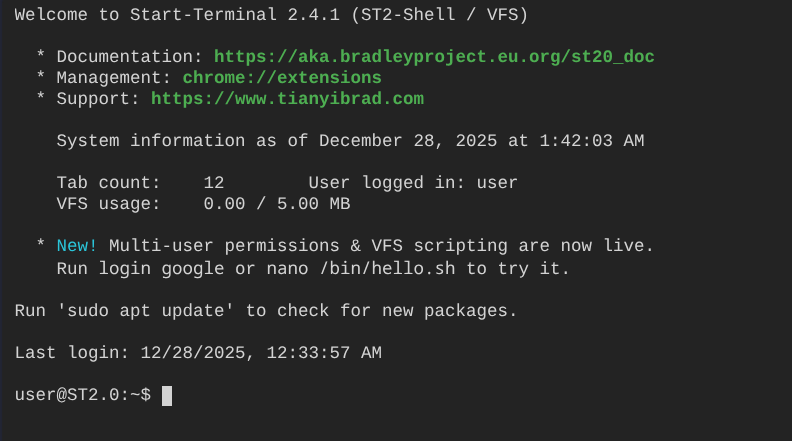
Tip: You can always verify if your system is up-to-date by looking for the update notification at the bottom of the welcome message.
¶ 2. Basic Commands
Try typing these commands to get a feel for the system.
¶ 📂 Explore Your Bookmarks
Your Chrome bookmarks are mounted as a file system. Use ls to list them.
# List files in the current directory
ls

# List with details (permissions, owner, date)
ls -l
¶ 3. Check more commands
You have plenty of commands available! Use help to check how to use them.
help
¶ What's Next
Now that you know the basics, explore more advanced features:
- core-concepts: Learn about the Virtual File System (VFS) and Pipes.
- package-manager: Install extra tools like
weatherorcowsayviaapt. - customization: Deep dive into themes and fonts.